






Most LinkedIn prospects can spot a merge field the moment they read the greeting.
What gets a reply is a visible reason the message reached them in particular, such as a post they commented on or a webinar they registered for with you.
That reason comes from the list.
Based on my experience, personalizing at scale is mostly decided before anyone writes a template, in the choice of who goes into each campaign and why they're grouped together.
I'll show you how I set that up in Meet Alfred, the multi-channel LinkedIn automation platform we build, in seven steps.
TL;DR
- Group prospects by something they share, like a post they engaged with, and give each group its own campaign, which in Meet Alfred means picking that group as the campaign's lead source.
- Write one message per group that mentions the shared context, and let Meet Alfred's AI-Personalization add each person's first name and company from their LinkedIn profile.
- For details LinkedIn doesn't hold, upload a CSV file with your own columns, and carry the profile fields into email and X steps as well.
- Answer replies yourself in Meet Alfred's Smart Inbox, then compare campaigns to find the opener that needs rewriting.
What does it mean to personalize LinkedIn messages at scale?
Personalizing LinkedIn messages at scale means sending one template to many prospects while each copy still reads as though it was written for the person receiving it.
Two layers make that work:
- Shared context: the reason a whole group is hearing from you, such as an event they're attending, typed into the template once because it's true for everyone on the list.
- Individual details: the parts that change per person, which Meet Alfred's AI-Personalization pulls from each LinkedIn profile or from a CSV file you upload.
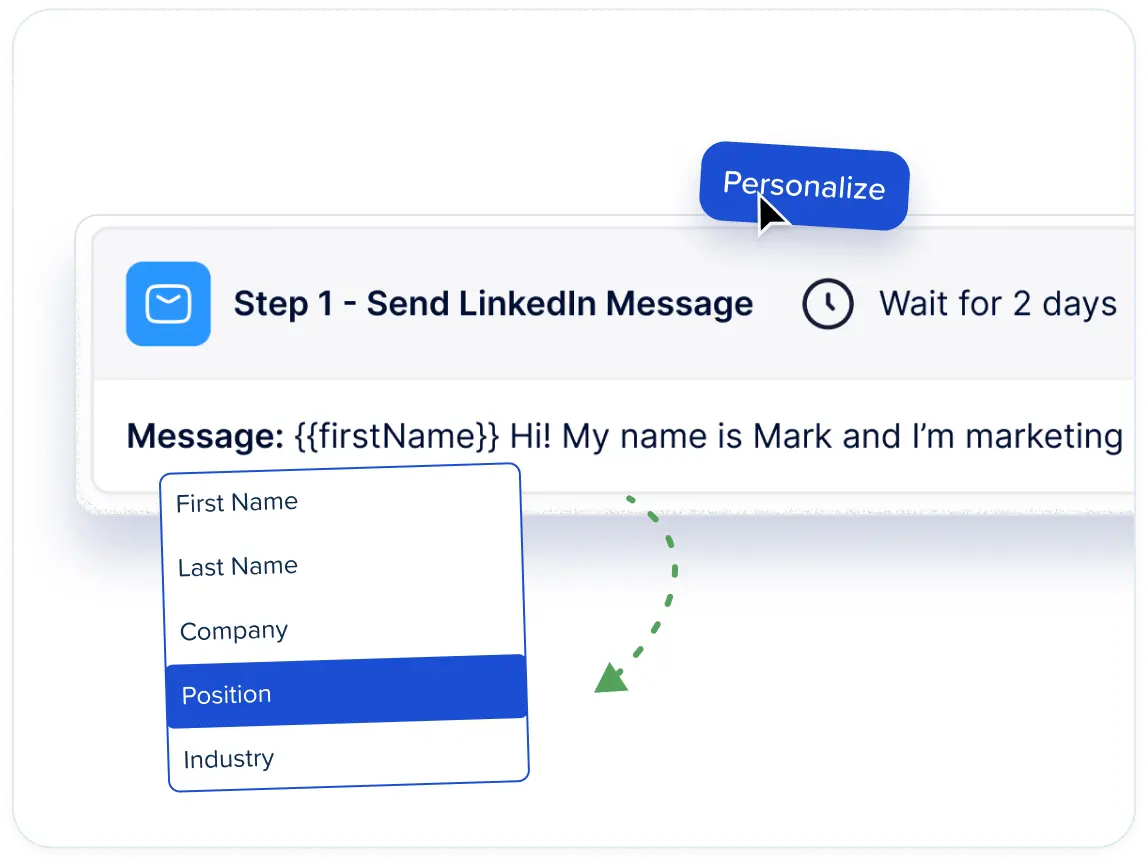
A message with only the second layer is the version prospects have learned to skip, because everything after the greeting is identical in every inbox it reaches.
That's why I put most of the effort below into the first layer.
If you're comparing platforms on the second one, I'd recommend our roundup of the 10 best LinkedIn personalization tools.
How do you personalize LinkedIn messages at scale?
You personalize LinkedIn messages at scale by giving each campaign one shared context and writing the template around it, with profile and CSV fields covering whatever differs from one prospect to the next.
If you're new to Meet Alfred, every campaign follows the same four-part workflow:
- Connect LinkedIn: link your LinkedIn account once, with two-factor authentication handled inside Meet Alfred, and campaigns then run from the cloud even while you're offline.
- Choose a lead source: each campaign starts from a source, such as a LinkedIn search or the people who engaged with a post.
- Build the sequence: add the steps each lead goes through, like a connection request followed by messages, with delays between them and personalization fields in the copy.
- Launch and reply: Meet Alfred runs the steps automatically and pauses a lead's campaign once they reply, so you can pick up the conversation in the Smart Inbox.
The seven steps below follow that workflow and add the personalization at each stage, with one running example throughout: a sales team selling job-scheduling software to operations managers at HVAC and plumbing contractors in the US.
Step 1: Give every campaign one shared context
You'll want to decide what everyone in a campaign has in common before you build anything.
That shared detail is the most personal line a template can carry without a single variable, and in Meet Alfred, the lead source you choose usually settles it for you:
I keep each source in its own campaign.
A campaign that mixes sources ends up sending a line about last week's post to group members who never saw it.
In the running example, the team starts with two:
- Campaign A: people who engaged with an industry post about technician shortages in the trades.
- Campaign B: a CSV of contacts who registered for the company's own webinar on dispatch planning, covered in Step 3.
Event audiences follow the same logic, and if you go that route, start with our guide to LinkedIn Events, which covers prospecting through attendee lists and timing the outreach around the event.
Step 2: Load the matching leads and clean them up in the LinkedIn CRM
It's ideal to create each campaign from the source that matches its context and strip out anyone who doesn't fit before the first message is scheduled.
Warm campaigns are quick to build.
Meet Alfred turns the audience of the post, event, group, or newsletter you pick into the campaign's lead list.
Cold campaigns begin with a search in LinkedIn or in AI Lead Finder, both of which filter on job title, industry, location, keywords, and language.
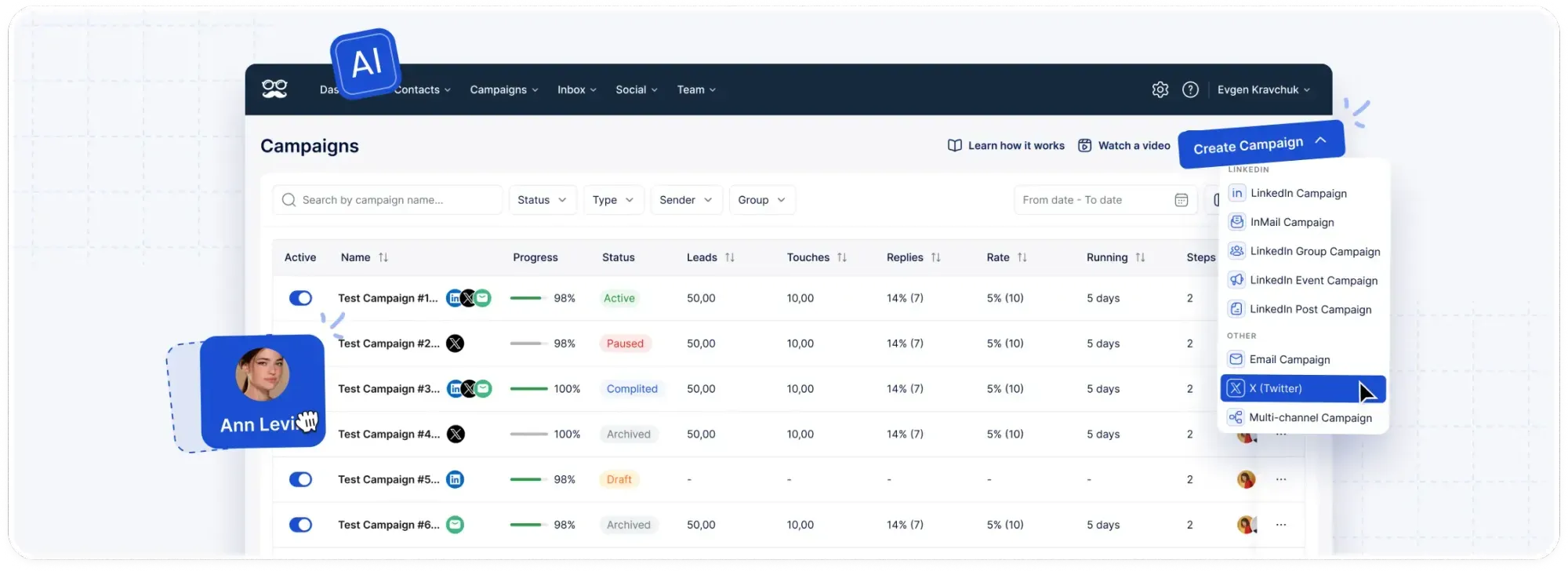
I always skim Preview sample results before setting the lead count, because a handful of returned profiles is enough to spot a wrong job title.
Sales Navigator searches and saved lists work too (the Sales Navigator guide on our blog covers using it for prospecting).
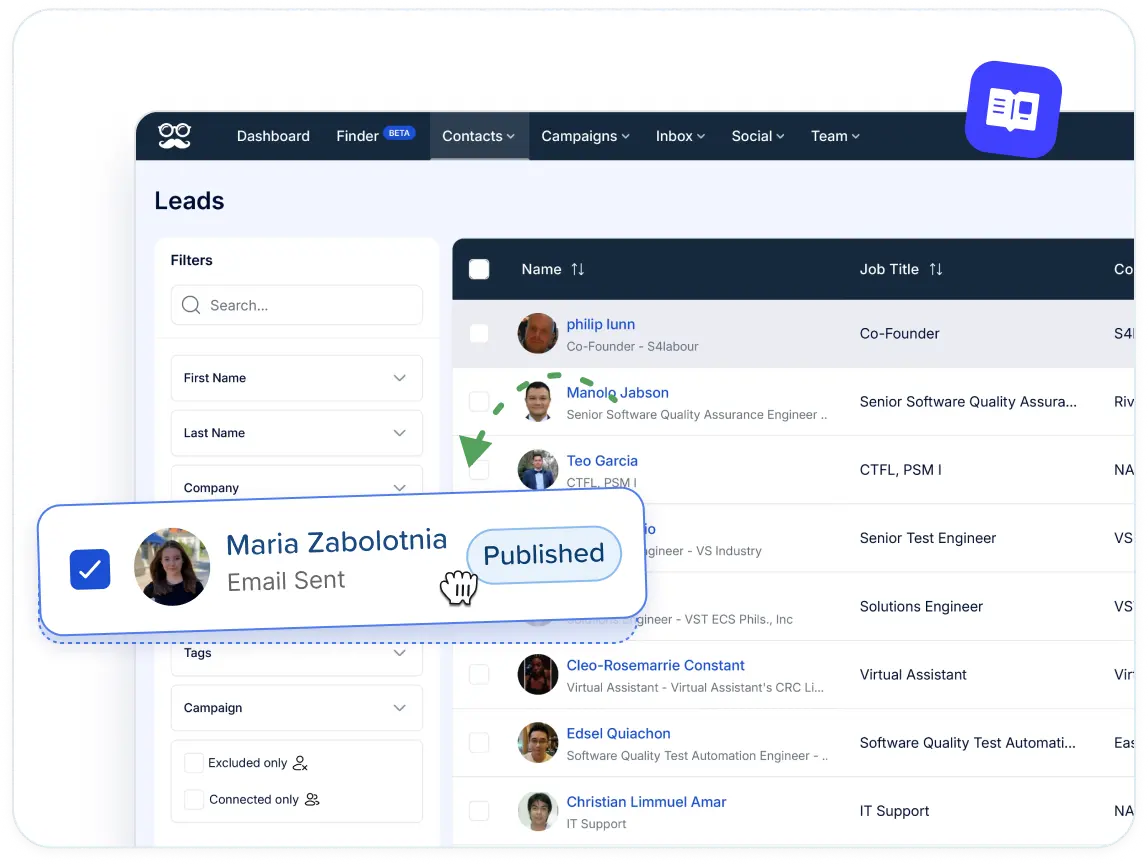
Every lead then lands in Meet Alfred's LinkedIn CRM, where I run four cleanup jobs before launch:
- Exclusions: profiles that will never buy, like job seekers or other software vendors.
- Blacklist: current customers and open deals, kept out of all future campaigns.
- Tags and notes: anything worth knowing before the first message, like a company you've quoted before or a contact who asked to hear back in spring.
- Connections view: leads and existing connections show separately.
Step 3: Add your own details through a CSV upload
For details a LinkedIn profile doesn't hold, a CSV upload fills the gap.
Meet Alfred captures each extra column in the file as a custom field available to any message in the campaign, as long as each row carries the contact's LinkedIn profile URL.
The columns worth adding are the ones only your company knows:
- Event history: the webinar a contact registered for with you.
- Product history: the plan a former trial user tested, or the specific feature they asked your support team about before the trial ended.
- Location: the city or service area on file.
- Relationship history: the colleague who referred them, or the month of your last conversation with that account.
No other sender can reference any of those.
Campaign B in my example is that webinar list, with a [Webinar session] column and a [Service area] column.
Before uploading, I'd normally fill or delete any row missing a value in a column the template uses, so every prospect gets a complete sentence.
Only include contacts you have a lawful basis to message, and check each country's privacy rules first.
Step 4: Write one template per campaign around its context
I write each campaign's template with the shared context typed in as ordinary text, then insert snippets wherever a detail changes from person to person.
In Meet Alfred, LinkedIn snippets carry profile details like first name and company, and the columns from your CSV come in as custom fields you place the same way.
For Campaign A, the connection note could say:
Hi [First name], I saw you engaged with the recent post on technician shortages. I help HVAC contractors like [Company] with scheduling. Happy to connect.
Only [First name] and [Company] change per lead, while the line about the post is typed once, since it's true for everyone who engaged with it.
Campaign B can lean harder on CSV columns once an invitation is accepted:
Hi [First name], thanks for registering for our [Webinar session] session. A few contractors around [Service area] asked how other teams handle same-day callouts, so I wrote up a short checklist. Want me to send it over?
I'd say one personal detail and one reason to connect is plenty for a connection note.
A note carrying five variables starts to read like a form letter, however well each field fills in.
Our Template Library holds more than 600 starting points sorted by channel and purpose.
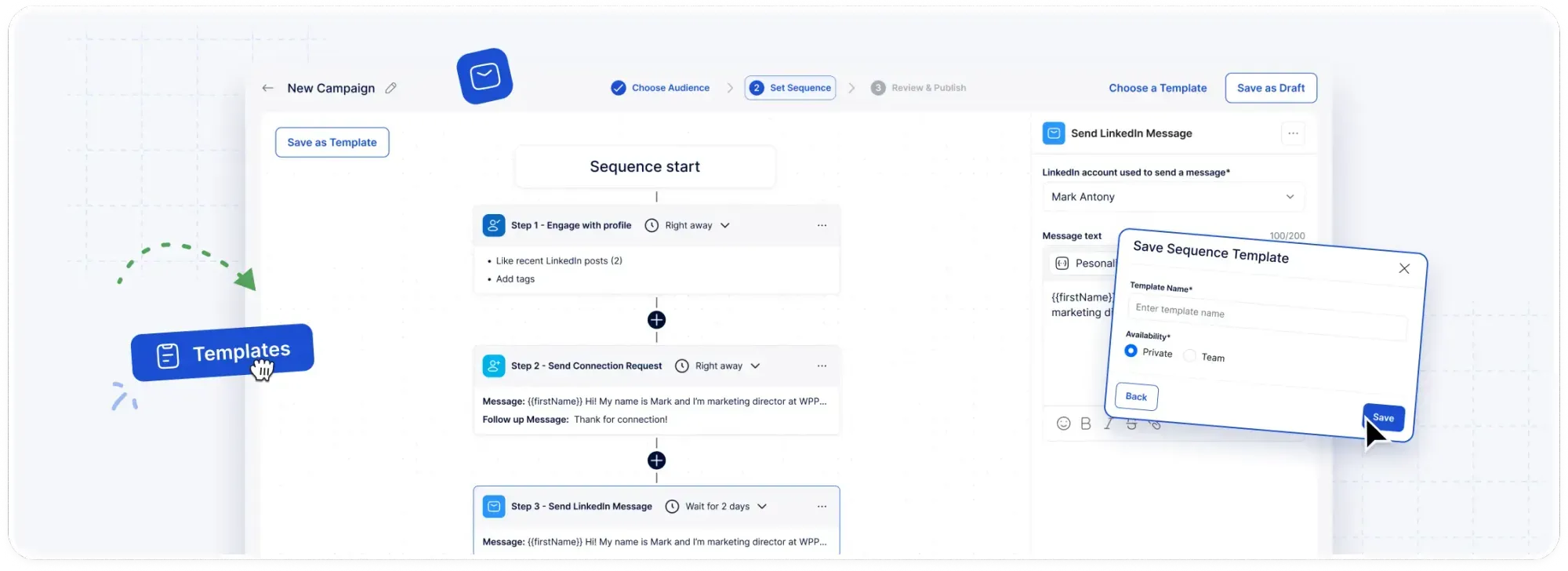
Each one still needs rewriting around your own campaign's context, but none of them leaves you facing a blank page.
When I need more written examples, I go to our list of 38 LinkedIn connection message templates, which includes openers built on common ground like a shared post or event.
Once a template starts getting replies, I share it as a team template so the next rep working that segment starts from tested copy.
Full multi-step sequences can be saved and shared like that too.
Step 5: Match the detail to each channel and space out the touches
I like to vary the amount of detail by channel.
The invite note stays a line or two, while the email step has room for the checklist or example the LinkedIn message promised.
Both draw on the same dynamic fields, which Meet Alfred supports in every step of a Multichannel Sequences campaign, whether that step is a LinkedIn message, an InMail, an email, or an X DM.
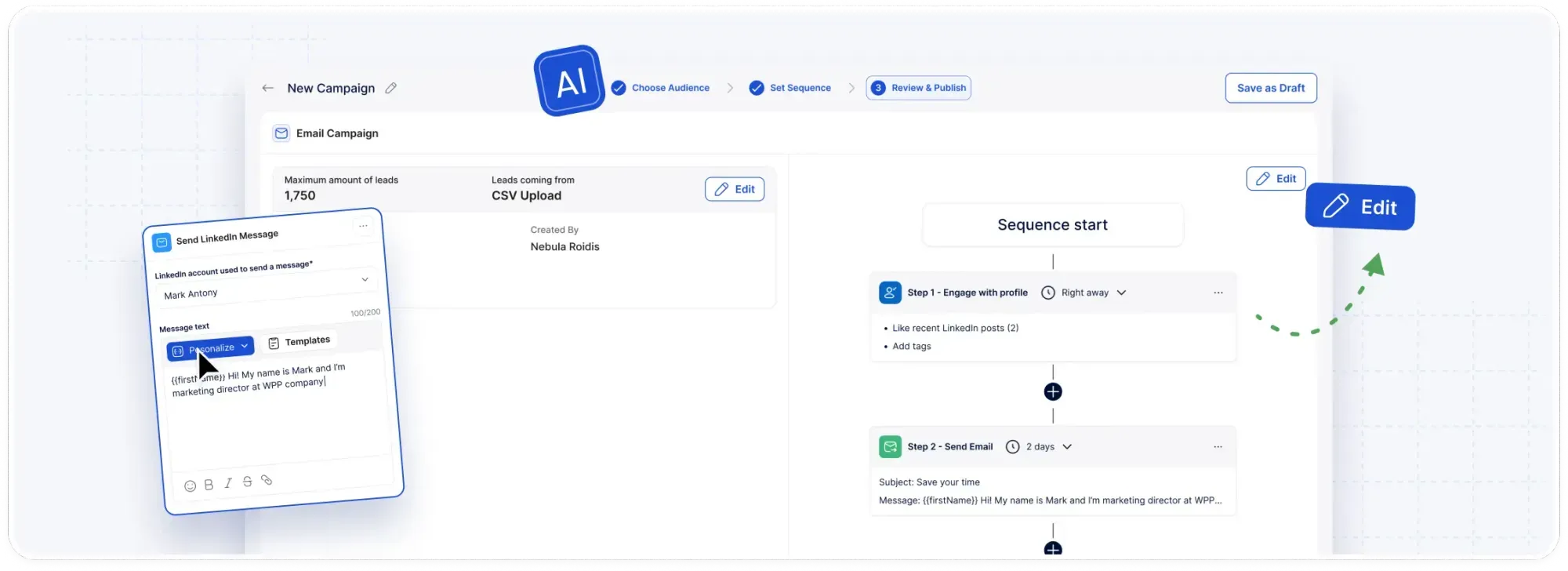
Email goes out through the mailbox you connect over SMTP or IMAP, to addresses from your 1st-degree connections' contact details or from a CSV upload.
You can set a sender alias and a personalized signature on those steps, and since Meet Alfred doesn't meter email in credits, your provider's own limits decide how much personalized email goes out.
On X, Meet Alfred can send personalized DMs to up to 1,000 prospects a day with the templates you've already written.
Timing affects how personal a sequence feels as well, and Meet Alfred's Customizable AI Settings control it:
- Delays between steps: set in the sequence builder, with follow-ups spaced days apart from the first message.
- Working hours and time zone: automation runs only inside the window set for the account, so for a list in one region, match the window to that region's working day.
- Randomized timing: irregular gaps between actions, like a person working through a list by hand.
- Daily limits: up to 100 connection requests a day within safe parameters, a level a newly connected account should build toward gradually over its first several weeks.
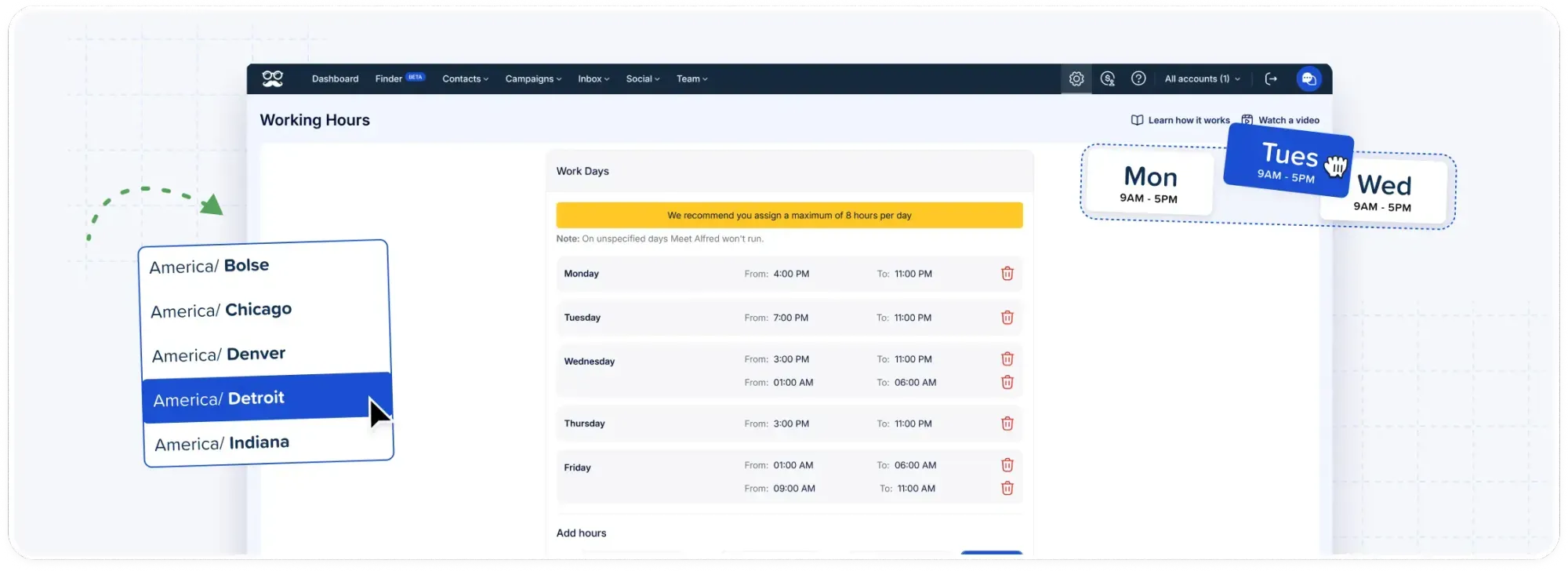
Our LinkedIn automation dos and don'ts lists the habits that most often get an account flagged, and it's the page I'd send any new rep to first.
Step 6: Answer replies with the prospect's profile on screen
When a prospect writes back on LinkedIn, reply detection stops their automated steps, so the next message they receive comes from a person.
A rushed first reply undoes a lot of careful setup.
The conversation appears in Meet Alfred's Smart Inbox, where four features keep the answer as specific as the campaign was:
- Profile details on screen: job title and company beside the thread, next to the tags and notes from Step 2.
- Inbox templates: saved replies for recurring questions, shareable across the team.
- Returning a lead: if a conversation ends without a meeting, the lead can re-enter a campaign directly from the inbox, and a "not now" in March can turn into a follow-up campaign later in the year.
- Team coverage: the Team Inbox collects every rep's threads, and Impersonation lets a manager reply from a teammate's connected account without anyone sharing a password.
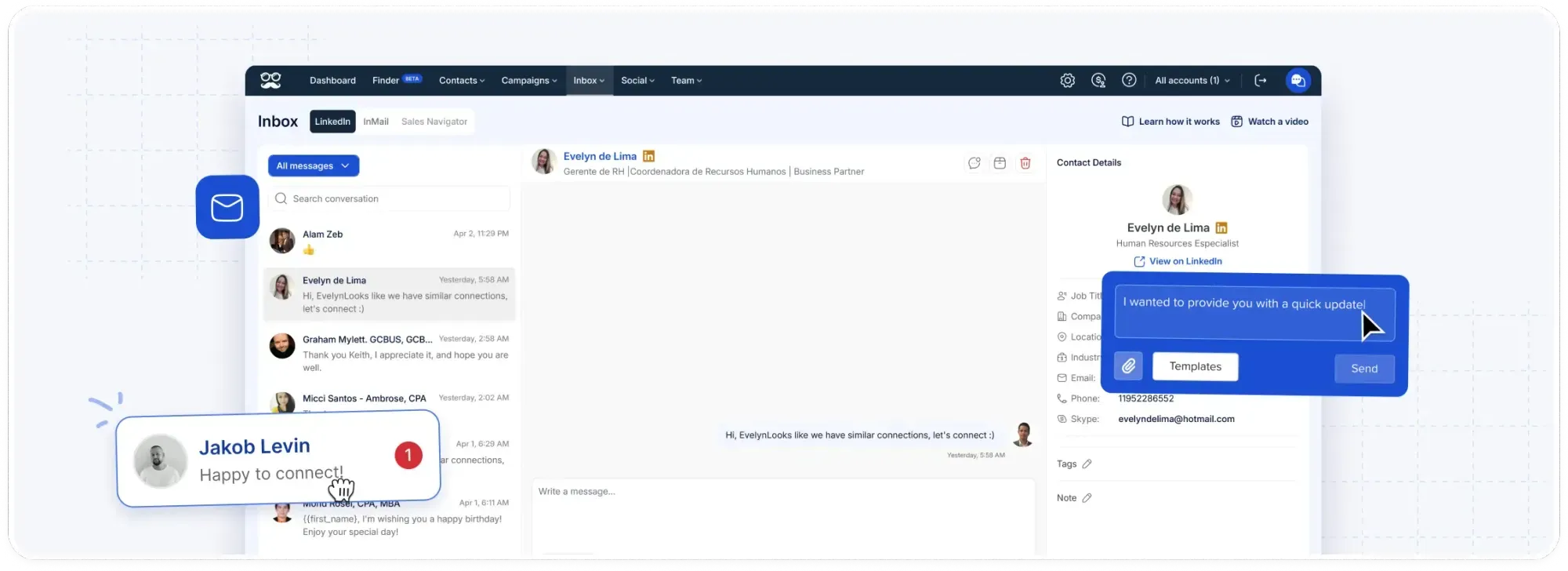
My rule is that an inbox template never goes out unedited, because the first human reply should mention something the prospect wrote, and that's the one detail no field can supply.
Step 7: Compare replies by campaign and rewrite the weakest opener
With one context per campaign, the campaigns overview in Meet Alfred's Reporting & Tracking puts each segment and its opener side by side.
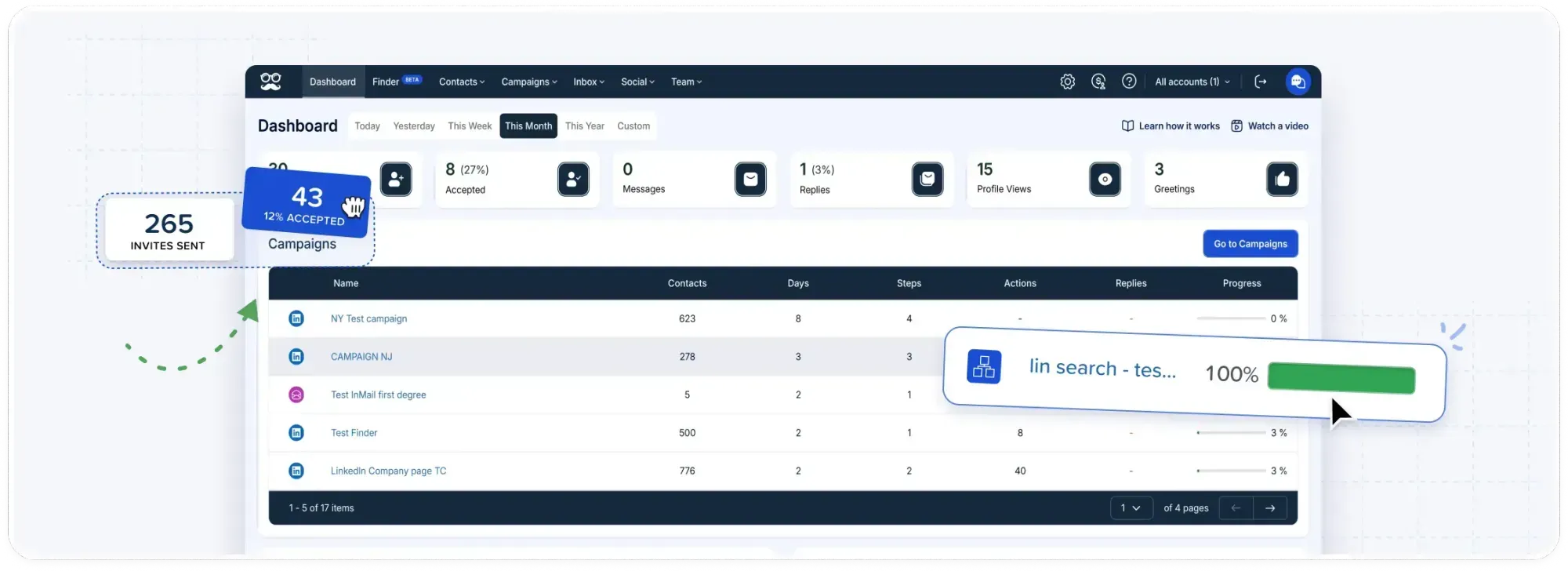
A gap between two campaigns reflects the audience as much as the copy, so I judge copy changes within the same campaign, round by round.
I tend to check two figures per campaign:
- Connections made: few new connections for the size of the list usually point at the connection note or the targeting, and the shared-context line is the first thing I'd rewrite.
- Replies after acceptance: plenty of acceptances with few replies usually means the first message after the invite is the weak link.
I've found it's best to change only one element per round, such as the context line or the call to action; otherwise the next set of numbers can't tell you which edit moved the result.
A rewrite that wins should replace the original in the team template, so the whole team working on that segment sends the new version.
The same overview also shows which source deserves the next campaign.
If the webinar list in Campaign B keeps replying far more often than the post engagers in Campaign A, the next list should come from your own records too.
How much does Meet Alfred cost for personalized LinkedIn outreach?
Meet Alfred's Individual plan costs $35/user/month when billed annually, based on our pricing as of October 2026.
A 7-day free trial comes first, with every feature unlocked and no credit card asked for.
Yearly billing cuts the monthly rate by 40%, quarterly by 20%.
- Individual, $35/user/month: LinkedIn-only campaigns from free or Premium LinkedIn accounts, the Smart LinkedIn Inbox, automated greetings, unlimited actions in each sequence, and AI Lead Finder capped at 1,000 results.
- Business, $59/user/month: unlimited campaigns, post and event sources, InMail, Sales Navigator, email and X steps, and Lead Finder results up to 5,000.
- Teams, $47/user/month: the Team Inbox, roles and permissions, White Label, Salesforce and HubSpot sync, priority support, a dedicated account manager, and a 10,000-result Lead Finder cap.
- Unlimited, custom quote: volume pricing, a premium SLA, white-glove onboarding, and custom White Label.
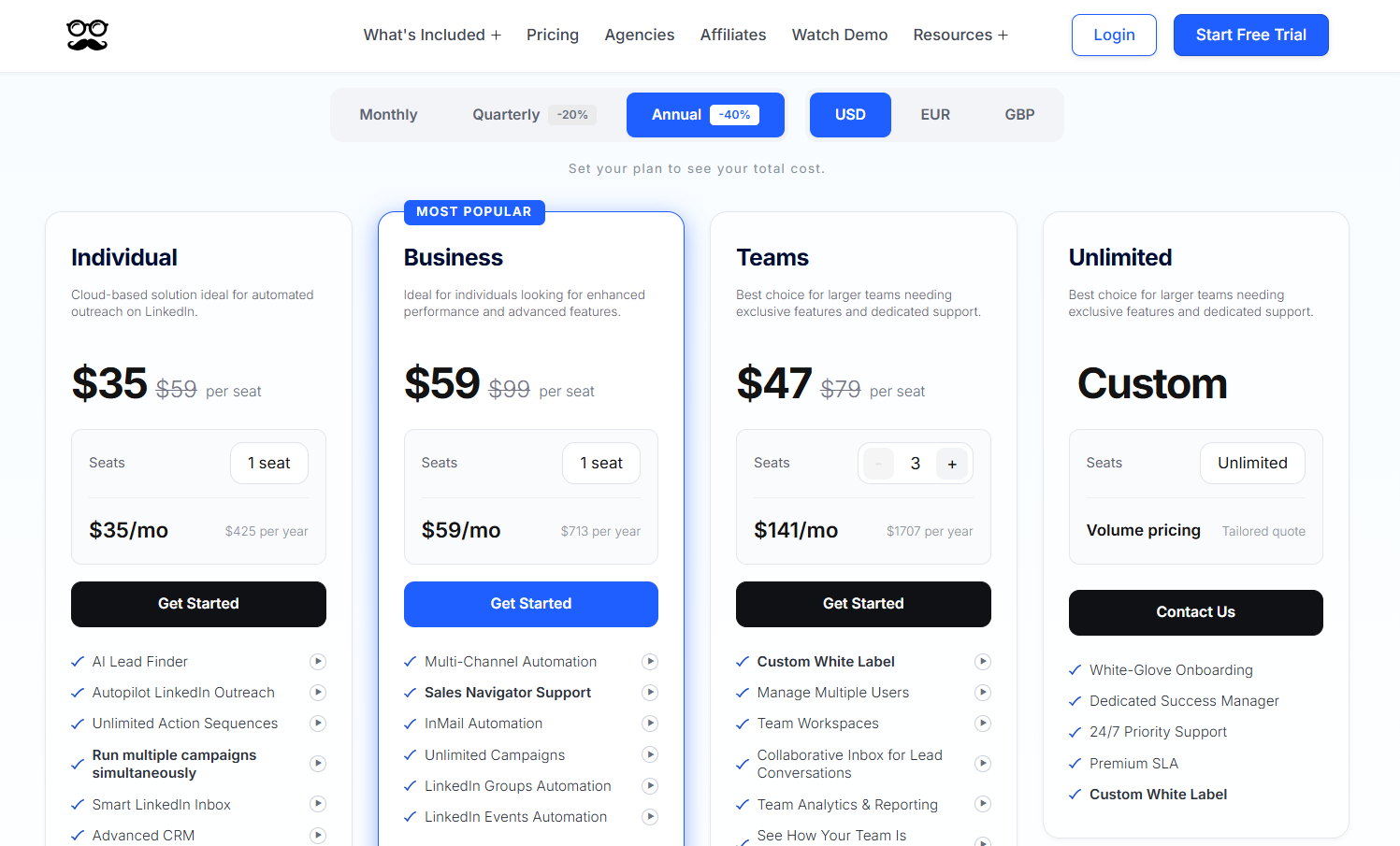
Individual runs a LinkedIn-only version of these steps from LinkedIn search and AI Lead Finder lists, while Business adds the post and event sources from Step 1 and the email and X steps from Step 5.
Sales teams and agencies with several reps on one account usually need Teams, which brings the Team Inbox and Impersonation from Step 6.
Start personalizing LinkedIn messages with Meet Alfred
If I were starting tomorrow, the first week would cover two campaigns: one built from a recent post's engagers and one CSV of people who already know the company, each with its own template.
Two weeks of replies would then show which opener to roll out next, and Meet Alfred handles all of it from a single dashboard.
You can try the steps on your own LinkedIn profile with our 7-day free trial, no credit card required.
Or book a demo if you'd like our team to look over your segments and templates before the first campaign goes out.
⚠️ Disclaimer: This article was last updated on the 22nd of October, 2026, and if there's any misinterpretation of the information, please contact us, and we will fact-check it.
Frequently asked questions
Is a first name enough to personalize a LinkedIn message?
No, a first name on its own rarely makes a LinkedIn message feel personal, since the text after the greeting is the same for all recipients.
Pairing it with a shared context, like the group or newsletter that connects you, gives the prospect a reason they were contacted.
Meet Alfred's AI-Personalization fills in the name, and the shared context is typed once per campaign.
How many personalization fields should one LinkedIn message use?
In my experience, one or two individual fields plus the campaign's shared context is enough for a connection note.
Each extra field is another spot where an unusual profile, such as a company name written in capitals or a job title listing several roles, can make the sentence read awkwardly.
Follow-ups and email steps have more room, and I usually save a CSV column like a service area for those.
Can you personalize LinkedIn messages without Sales Navigator?
Yes, Meet Alfred personalizes messages from Basic (free) and Premium LinkedIn accounts too.
LinkedIn search, AI Lead Finder, CSV uploads, and warm audiences like post engagers all work as sources, though some of them, Sales Navigator included, need one of the higher plans in the pricing section above.
Free LinkedIn accounts get a smaller monthly allowance of personalized invitation notes than paid ones, and I'd spend those notes on the warmest campaigns first.
Does personalizing LinkedIn messages lower the risk of a restriction?
Personalized copy can help, though no message style removes the risk, because LinkedIn looks for automated behavior whichever tool sends the messages.
You'll want it alongside conservative daily limits and natural pacing, both of which Meet Alfred's Customizable AI Settings control.
For more on keeping an account in good standing, the beginner's guide to LinkedIn outreach on our blog is a good next read.
Gustavo Parra is a Senior SEO & Content Strategist at Meet Alfred, where he specializes in LinkedIn automation, AI-driven outreach, and account-safe growth strategies. He works closely with product, engineering, and support teams to design automation frameworks that help sales teams and agencies scale LinkedIn outreach while minimizing risk. Gustavo focuses on turning real platform data and firsthand product experience into practical, compliance-first guidance.
Related Articles