






Based on my experience, the point where a LinkedIn template lands in a sequence affects replies as much as its wording.
So I've written all ten of these for one B2B sales campaign, in the order a prospect would receive them.
The example I'll use throughout is an account executive at a contract management software company, reaching out to heads of legal operations at US companies with 200 to 1,000 employees.
For each template, I'll show you when it goes out and which fields fill in on their own.
After that, I'll walk through how we run the full campaign in Meet Alfred, our multi-channel outreach platform for LinkedIn.
💡 If you haven't used Meet Alfred before, it's a cloud-based tool that connects to your LinkedIn account and sends profile visits, connection requests, messages, and emails on a schedule you set.
TL;DR
- The ten templates run in sending order: two openers, five automated follow-ups across LinkedIn and email, two replies written by hand, and a greeting for months later.
- The connection note in Template 1 fits LinkedIn's 200-character limit for invitation notes, and I'd plan around free accounts getting only three personalized notes a month.
- Each message asks for a single response, like a one-line answer or a yes to a PDF.
- Meet Alfred sends the automated steps and pauses a prospect's sequence once they reply on LinkedIn, and from then on I handle the conversation myself.
What makes a LinkedIn outreach template get replies?
A LinkedIn outreach template gets replies when the reason for writing is specific to the prospect, and the ask takes them a few seconds to answer.
In my campaigns, that reason almost always traces back to the lead source.
A person who commented on a post about your topic has handed you something real to mention, and a name from a cold search can't offer that.
Length is the other constraint, and part of it is set by LinkedIn.
LinkedIn's help page on personalized invitations caps connection notes at 200 characters.
On a free account, only three requests a month can carry a note, while Premium members can personalize all of them.
Once someone accepts, messages can run much longer, though I usually keep mine to four or five lines on a phone screen.
All ten templates come from the same campaign:
- Seller: an account executive at a contract management software company.
- Buyer: heads of legal operations at US companies with 200 to 1,000 employees.
- Lead source: people who engaged with a popular LinkedIn post about contract review backlogs, written by someone else in the legal ops space.
- Offer: a benchmark of contract turnaround times that the seller's company has published.
If you're still deciding who to target, it's ideal to start with our B2B lead generation guide for LinkedIn.
Anything in square brackets is a variable. Fields like [First name] and [Company] come from each prospect's LinkedIn profile.
Details a profile doesn't show either go into a CSV column or get written once before launch.
What are the 10 best LinkedIn outreach templates?
The 10 best LinkedIn outreach templates for a B2B sales campaign cover each message from the first connection note through to a greeting sent months after the final follow-up.
Before a template made the list, I checked it against four criteria:
- It stays within LinkedIn's limits for that message type.
- It refers to something true about the prospect, or about how I found them.
- It asks for one thing.
- In the automated steps, every variable fills in on its own, apart from one customer detail in Template 5.
Here are the outreach templates:
Note: Rows marked Meet Alfred go out automatically as steps in a sequence, which is the ordered list of actions each prospect in a campaign moves through.
The two rows marked You are replies are messages a person writes and sends.
1. Connection note for people who engaged with the post
I send the invitation note on day 2, a day after Meet Alfred visits the prospect's profile as the first step of the sequence.
Hi [First name], I noticed you engaged with the post on contract review backlogs. I work with legal ops teams on that exact problem and would be glad to connect.
With Alexandra as the first name, the note comes to 158 characters.
I reference the post because it's true for every person in the campaign, and that means the line only has to be written once.
You'll notice there's no pitch or link in it.
We've also published 38 LinkedIn connection message templates for other situations, like a shared event or a mutual connection.
If the sending account is on LinkedIn's free tier, I'd move it to Premium before running a note-led campaign like this one.
Three notes a month won't cover a list of post engagers.
2. InMail for prospects with an Open Profile
Some of the people engaging with the post will have an Open Profile, and for them I'd skip the invitation and send this InMail on day 2.
An Open Profile is a LinkedIn Premium setting that lets anyone outside a member's network message them without using InMail credits.
Anyone new to InMail can read our guide to messaging prospects outside your network first.
Subject: Contract review times at [Company]
Hi [First name], you engaged with the recent post on contract review backlogs, so I'll keep this short.
We've put together a benchmark of contract turnaround times at companies around the size of [Company]. Would it help if I sent it over?
InMail gives you much more room than an invitation, but I'd keep the body this brief anyway.
I put the company name in the subject line because it's the word people spot first when they scan a list of unread messages.
Meet Alfred's InMail automation sends Open Profile InMails alongside connection requests.
Templates 3 to 7 need an accepted connection, though, so an Open Profile prospect who doesn't answer the InMail leaves the campaign at this point.
3. First message after the connection is accepted
The first real message should be easy to reply to.
I build it around a two-option question and send it two days after the invitation is accepted.
Glad we're connected, [First name].
Since you were in that backlog thread: is most of the review volume at [Company] sales contracts, or more vendor and procurement paper?
A choice between two options takes a few seconds on a phone.
From the prospect's answer, the seller knows which part of the benchmark to lead with in Template 4.
Anyone who answers here won't get Templates 4 to 7, because Meet Alfred's reply detection stops the automated messages as soon as a prospect writes back on LinkedIn.
4. Benchmark offer
Four days after Template 3, I offer the benchmark and let the prospect decide.
[First name], we recently finished a benchmark on contract turnaround at companies with 200 to 1,000 employees.
Page two breaks down median review time by contract type, along with the steps that slow most teams down.
Want me to send you the PDF?
A PDF arriving from someone you connected with less than a week ago tends to read like marketing, while a yes to a short question opens a real exchange.
Attachments do work in Meet Alfred's LinkedIn and email steps, for anyone who'd prefer to send the file straight away.
5. Follow-up with one new detail
Five days later, the second follow-up brings one new fact into the conversation.
[First name], a legal ops lead I spoke with last month said [one real detail from a customer conversation].
Does that sound anything like what you're seeing at [Company]?
I'd never automate the customer detail in brackets.
It has to be a true, specific point from a real customer conversation, such as the week a client's review queue finally fell below their target.
I write it once, before launch.
Without a real detail, Template 5 is better left out of the sequence.
6. Email for connections who haven't replied
Prospects who accepted but stayed quiet get an email three days after Template 5, as long as their address is available.
Subject: [Company] and contract review times
Hi [First name],
We connected on LinkedIn after the post on contract review backlogs, and I've sent you a few messages there since.
In case LinkedIn isn't where you read messages, here's the short version: we help legal ops teams cut review time on standard agreements, and the benchmark I mentioned is ready whenever you'd like it.
Is this worth a conversation this quarter, or should I leave it for now?
[Your name]
In Meet Alfred, email steps go out from your own mailbox, such as Gmail or Outlook.
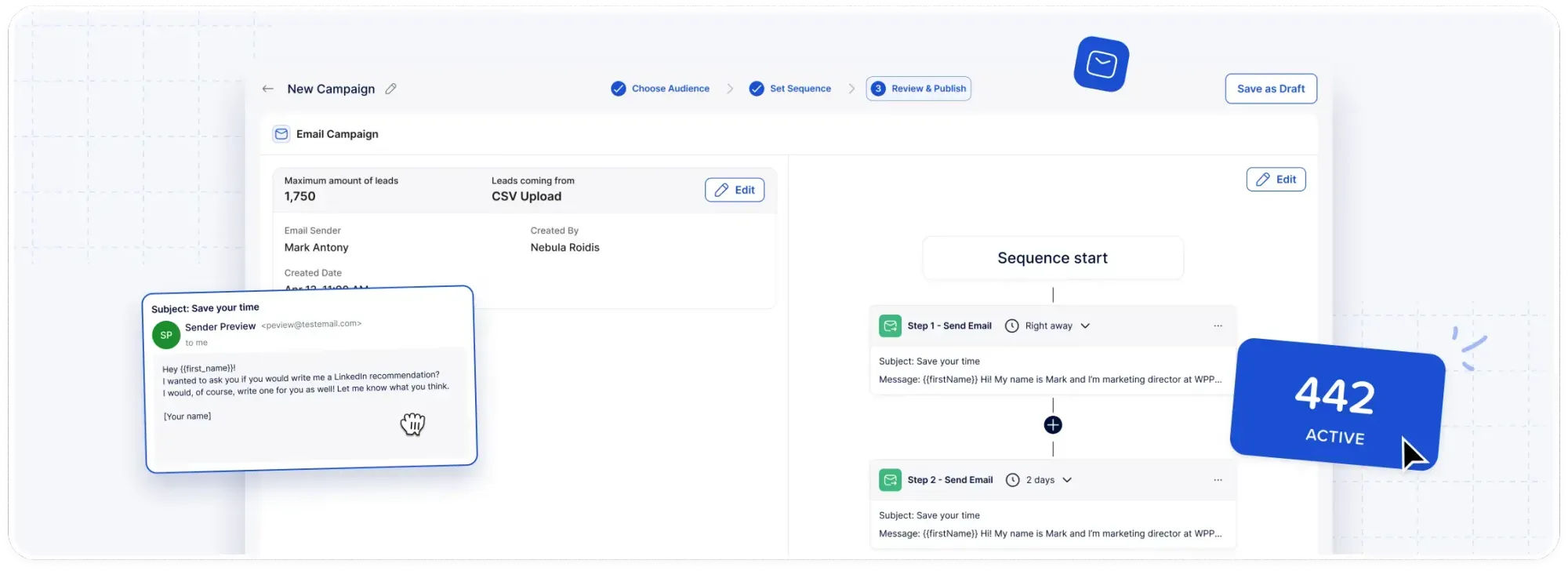
After a one-time SMTP or IMAP connection, addresses come from a CSV upload or from 1st-degree connections in our LinkedIn CRM, the contact database built into Meet Alfred.
I'd check the cold email rules in each prospect's country first.
7. Referral ask
Template 7 closes the automated part of the campaign four days after the email, and it asks the prospect for a name.
Last one from me, [First name].
If contract intake at [Company] belongs to someone else on your team, who would be the right person to ask? A name is plenty.
People who haven't answered anything so far will often still reply to a question that takes five seconds and commits them to nothing, at least in my campaigns.
As the message says it's the last, I make sure nothing comes after it in the sequence.
8. Reply that books the call
When a prospect says they'd like to talk, I answer from Meet Alfred's Smart Inbox with something close to this.
Thanks, [First name]. I'll bring the benchmark numbers for companies your size, and I'd like to hear how contract intake works at [Company] today.
Does Thursday at 3 pm your time work for 25 minutes? If not, [Calendar link] shows my open slots.
I open with what the prospect will get from the call, then suggest one time with a calendar link as a fallback.
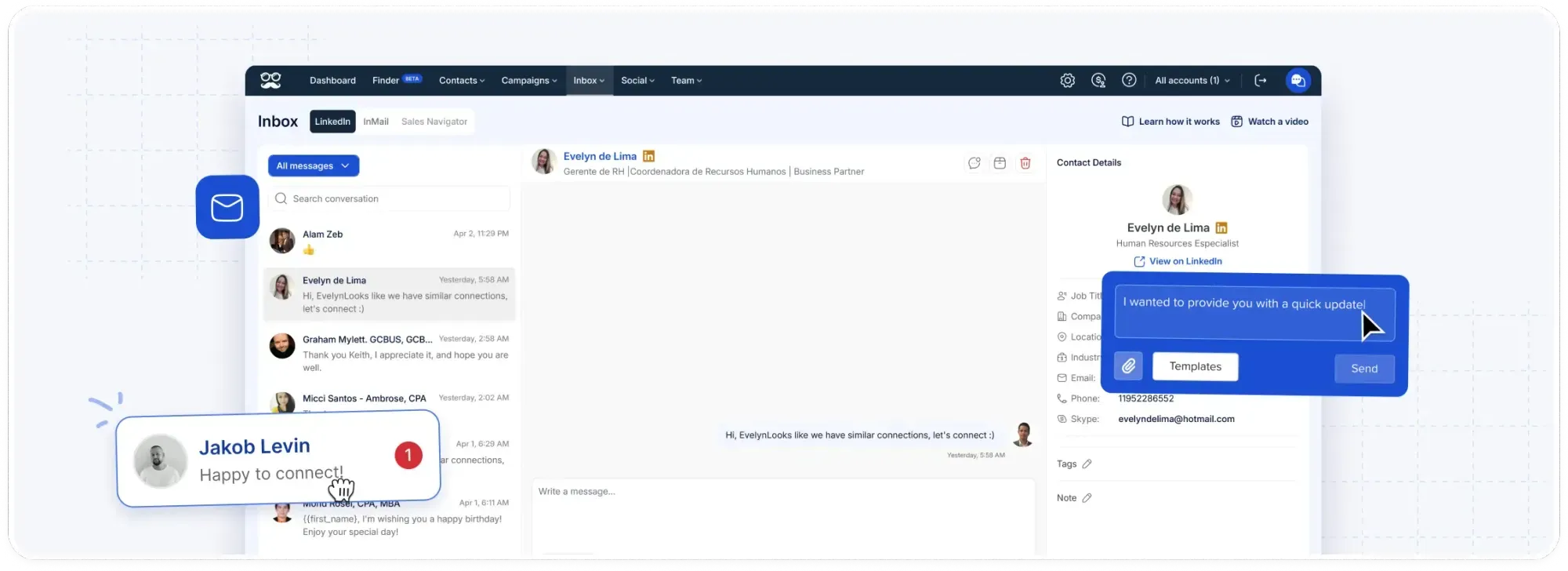
The Smart Inbox collects LinkedIn conversations from every connected account in one view, and saving this reply there as an inbox template keeps every rep on the same structure.
The job title beside each thread shows me whether someone else should join the call.
9. Reply to "we already have a tool for this"
This is my go-to reply for a common objection in software sales, and it says nothing negative about the tool the prospect already uses.
That makes sense, most legal ops teams we talk to have something in place.
Out of curiosity, which part of contract review does [Tool name] still leave to email or spreadsheets? If the answer is none, I'll take that as good news and leave you to it.
The tool's name gets typed in by hand, using whatever the prospect called it.
A question about the gap is easier to answer honestly than a feature comparison.
The last line gives them a polite way to say no, which lowers the pressure on the whole exchange.
I tag these threads in the Smart Inbox so I can find them again when renewal season comes around.
10. New-role greeting
Months after the campaign ends, Meet Alfred's automated greetings can send this message when LinkedIn shows a prospect has started a new role.
Congrats on the new role, [First name]. Hope the first few weeks are going well, and if I can help with anything as you settle in, just say.
Automated greetings are messages Meet Alfred sends on a connection's birthday, work anniversary, or new role, or as thanks for an endorsement.
Because automated greetings can reach other connections too, I keep the wording general enough for anyone who changes jobs, with no reference to the earlier conversation.
A reply from a former prospect lands in the same LinkedIn thread as Templates 3, 4, 5, and 7, with the earlier context right above it in the Smart Inbox.
From what I've seen, people in a new role are often reviewing the tools they inherited.
A greeting like this one between campaigns is social selling on LinkedIn in its lightest form.
How do you send these LinkedIn outreach templates with Meet Alfred?
The seven automated templates run from a single Meet Alfred campaign built on the post's engagers, with a delay set before every step.
Templates 8 to 10 come from the Smart Inbox and automated greetings.
The steps start from a brand-new account, so you don't need Meet Alfred set up already.
Step 1: Sign up and connect your LinkedIn account
Meet Alfred runs in the cloud, so there's nothing to install, and campaigns keep sending while your computer is off.
I'd start with the 7-day free trial and connect the LinkedIn account that will send the campaign.
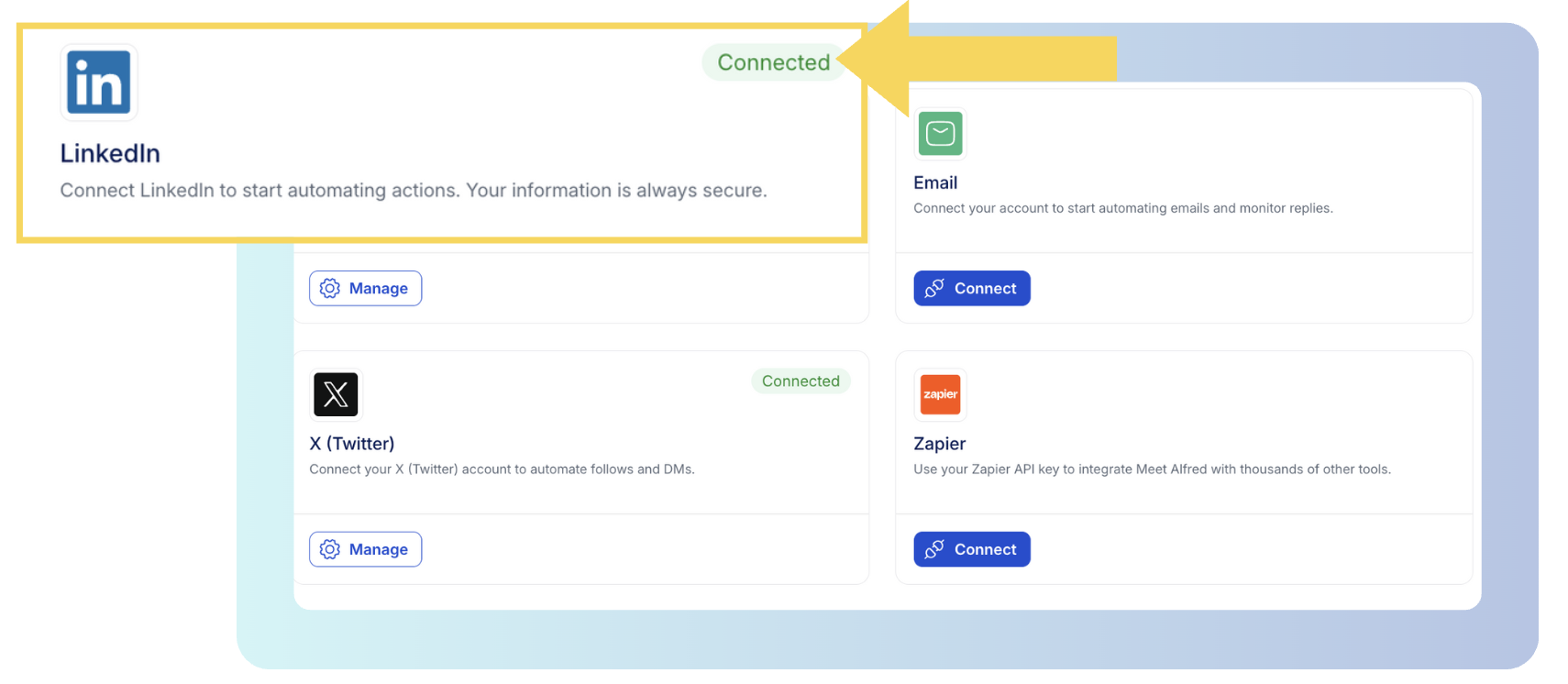
If LinkedIn asks for two-factor authentication, you complete it in the Meet Alfred app while connecting.
In the settings, I set working hours in the prospects' time zone and keep the daily limit for connection requests conservative while the account warms up.
Our LinkedIn automation dos and don'ts guide covers safe limits in more depth.
Since Template 6 is an email, I'd also connect a mailbox over SMTP or IMAP at this stage.
Step 2: Create a campaign from the post's engagers
Next, I create a LinkedIn Post campaign and point it at the post on contract review backlogs.
A LinkedIn Post campaign is a Meet Alfred campaign type that targets the people who liked or commented on a specific post.
The post doesn't have to be yours, because Meet Alfred can pull engagers from anyone's post.
It's ideal to keep each campaign to a single post, since that way every reply in Step 7 traces back to one source.
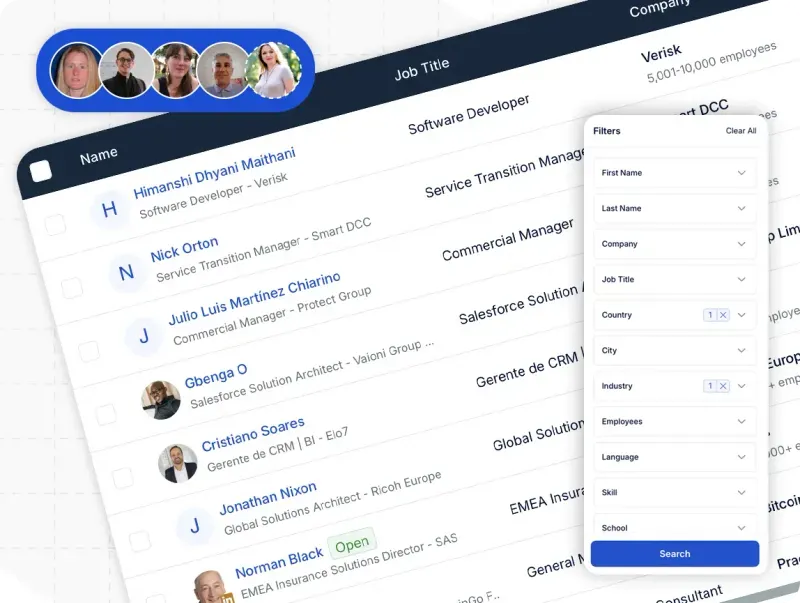
Current customers and open opportunities go on the blacklist in our LinkedIn CRM before launch, which stops them from entering the campaign.
With no suitable post to work from, I'd look at the other sources in our guide to prospecting on LinkedIn, and attendees of LinkedIn Events work in much the same way.
Step 3: Save each template with its variables
Then I save the automated templates in Meet Alfred's template library, the place where reusable messages are stored, with a variable wherever a bracket appears.
AI-Personalization, the feature that pulls details from each prospect's profile, fills in [First name] and [Company].
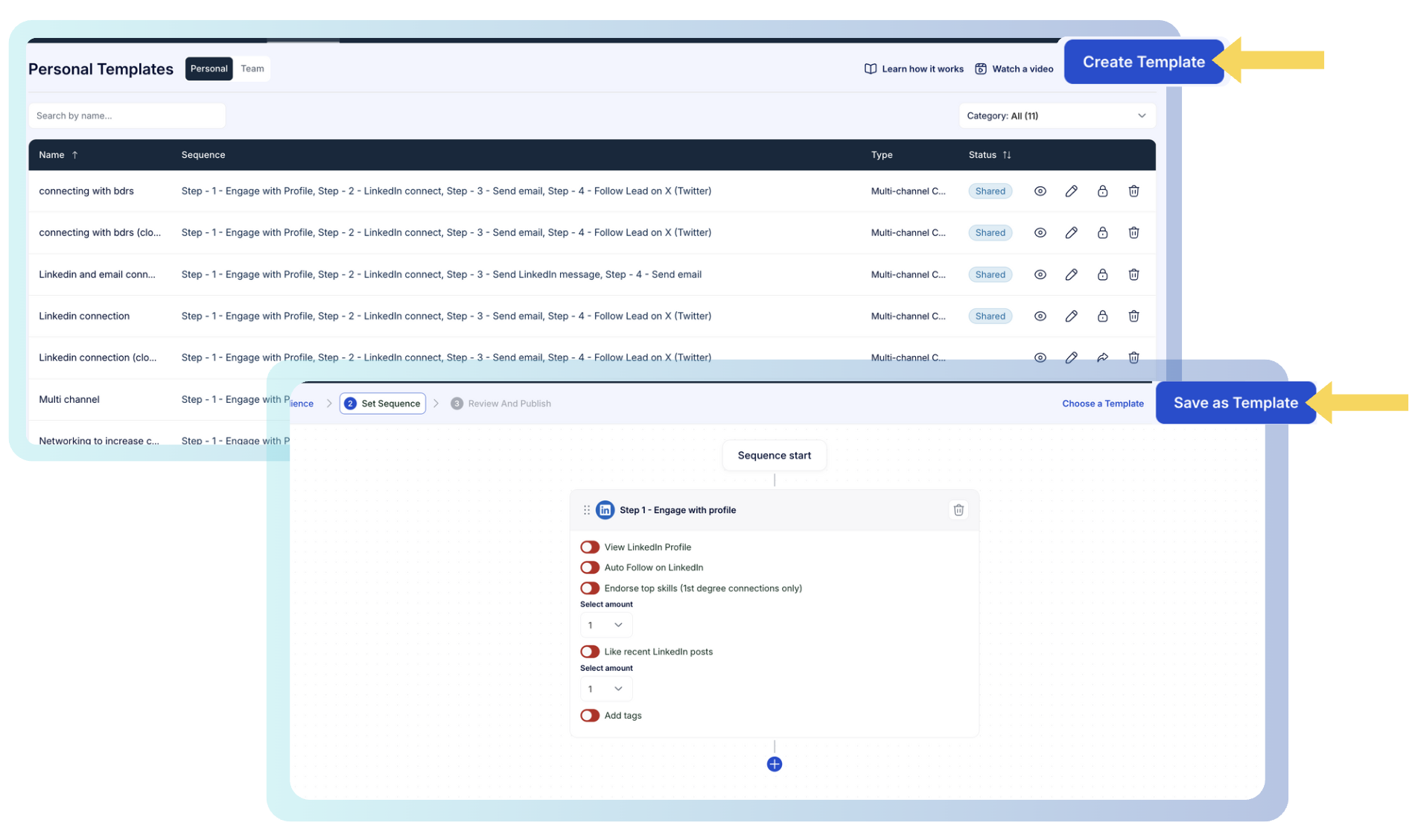
For campaigns built on a CSV list, extra columns such as contract volume can go in as custom snippets, though this campaign doesn't use any.
If other reps run similar campaigns, you'll want the templates shared with the team.
Because a person sends Templates 8 and 9, I keep those two as inbox templates in the Smart Inbox.
The library also has more than 600 ready-made templates, and they make a good starting point for campaigns built on other lead sources.
Step 4: Build the sequence and set the delays
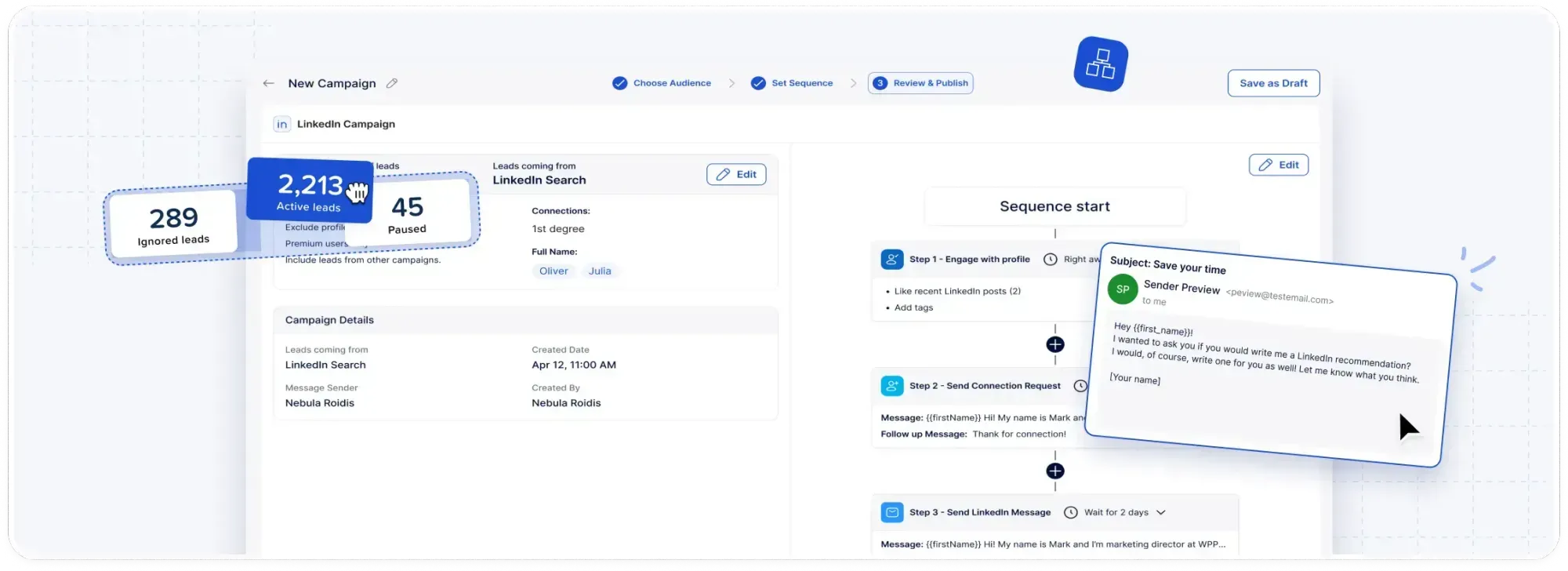
In the Multichannel Sequences builder, where a campaign's steps get arranged, I add them in the same order as the table above.
A profile view comes first, with a delay before every step that follows.
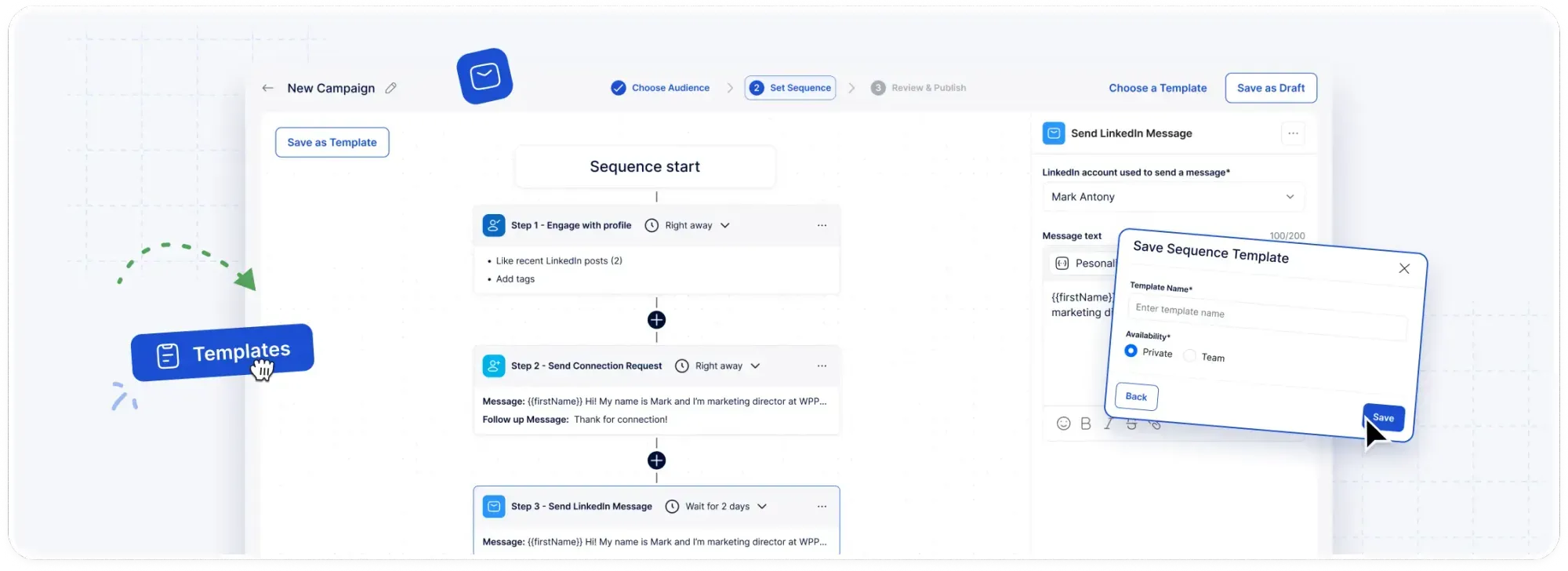
Template 1 is the note on the connection request, and Template 2 is the Open Profile InMail.
Template 6 is the only email step. Templates 3, 4, 5, and 7 all go in as LinkedIn messages.
Mixing LinkedIn and email in one sequence gets a fuller treatment in the B2B multichannel outreach playbook.
Inside the working hours from Step 1, set in Customizable AI Settings, Meet Alfred randomizes the gap between actions, so the steps don't fire at the same minute for every lead.
Once a sequence performs well, it goes into my campaign sequence templates for the next post-engager campaign.
Step 5: Let reply detection hand conversations to a person
Meet Alfred stops a prospect's sequence as soon as they reply on LinkedIn, and from that moment the conversation is mine to handle.
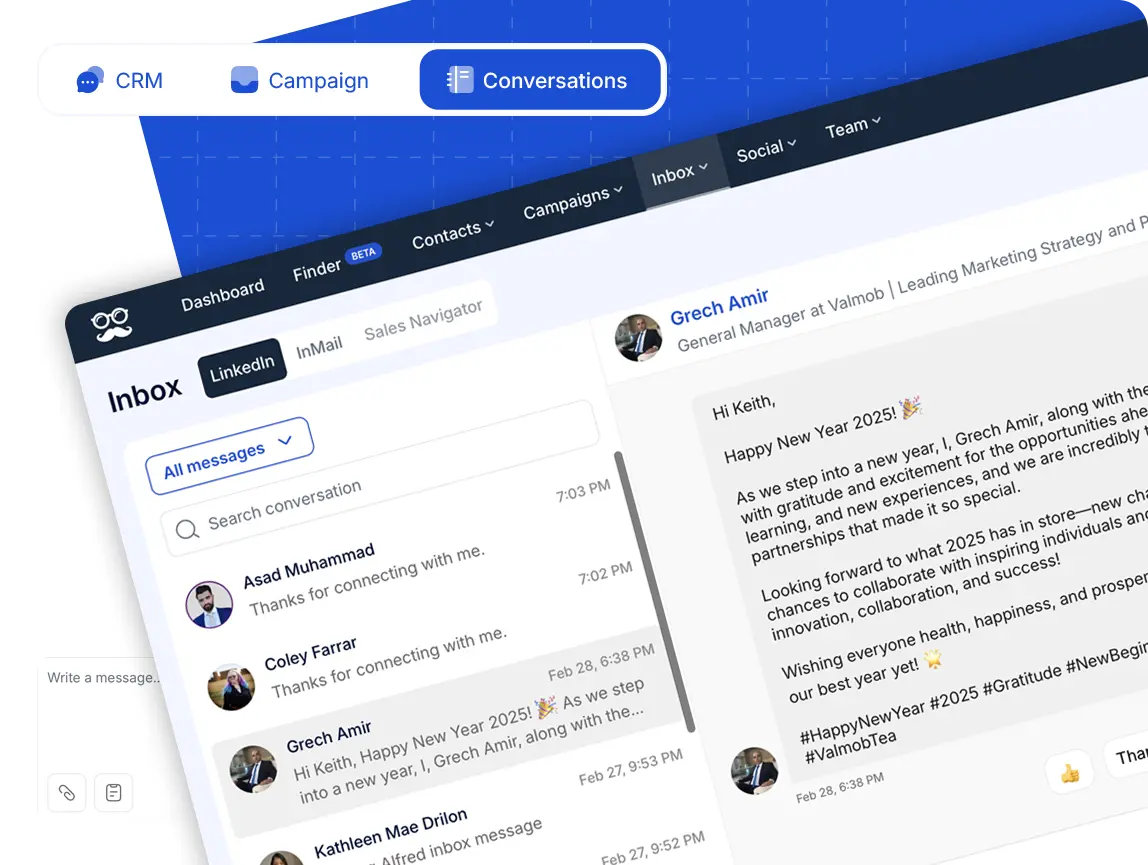
I answer from the Smart Inbox, which collects LinkedIn replies together with InMail and Sales Navigator threads.
Based on my experience, a short note on what the prospect said, plus a tag, saves time for whoever picks the thread up next.
Step 6: Switch on the new-role greeting
For Template 10, I turn on the new-role greeting in Meet Alfred's automated greetings and paste the template in as its message.
Meet Alfred offers four greeting types, though this campaign only needs the new-role one.
Step 7: Review the replies each week
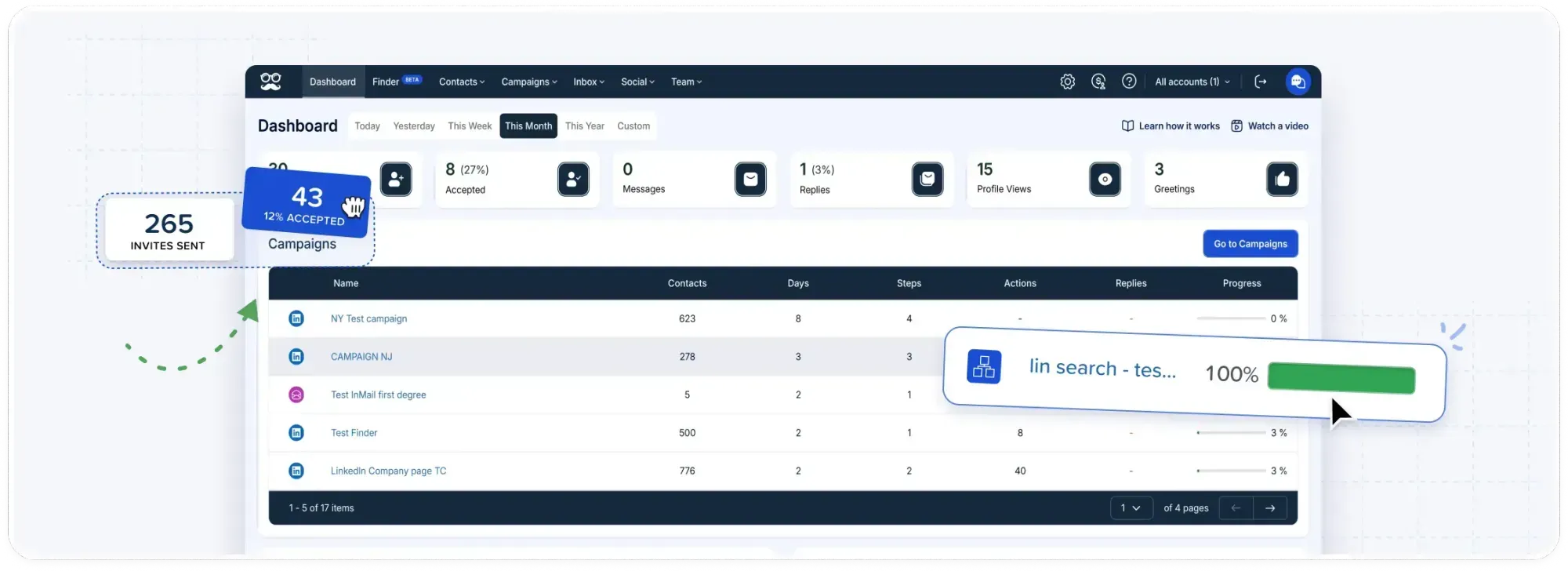
Once a week, I'd compare results in Reporting & Tracking, Meet Alfred's analytics dashboard, mainly the replies overview and the campaigns overview.
The prospect's conversation in the Smart Inbox shows which template they were answering.
I'd normally rewrite one template at a time, so any shift in replies can be traced to that single change.
How much does Meet Alfred cost?
I'd test the campaign on our 7-day free trial first. Paying annually knocks 40% off the monthly price, and paying quarterly knocks off 20%.
- Individual, $35/user/month: 1,000 AI Lead Finder results, LinkedIn automation on Basic and Premium accounts, the Smart LinkedIn Inbox, automated greetings, and message templates.
- Business, $59/user/month: 5,000 AI Lead Finder results, LinkedIn Post, Event, Group, and Newsletter campaigns, email and multichannel sequences, InMail automation, custom personalization, attachments, unlimited campaigns, and Zapier and webhooks.
- Teams, $47/user/month: 10,000 AI Lead Finder results, roles and permissions, team inbox management, native Salesforce and HubSpot integrations, White Label, and a dedicated account manager.
- Unlimited, custom quote: volume pricing with white-glove onboarding and a premium SLA.
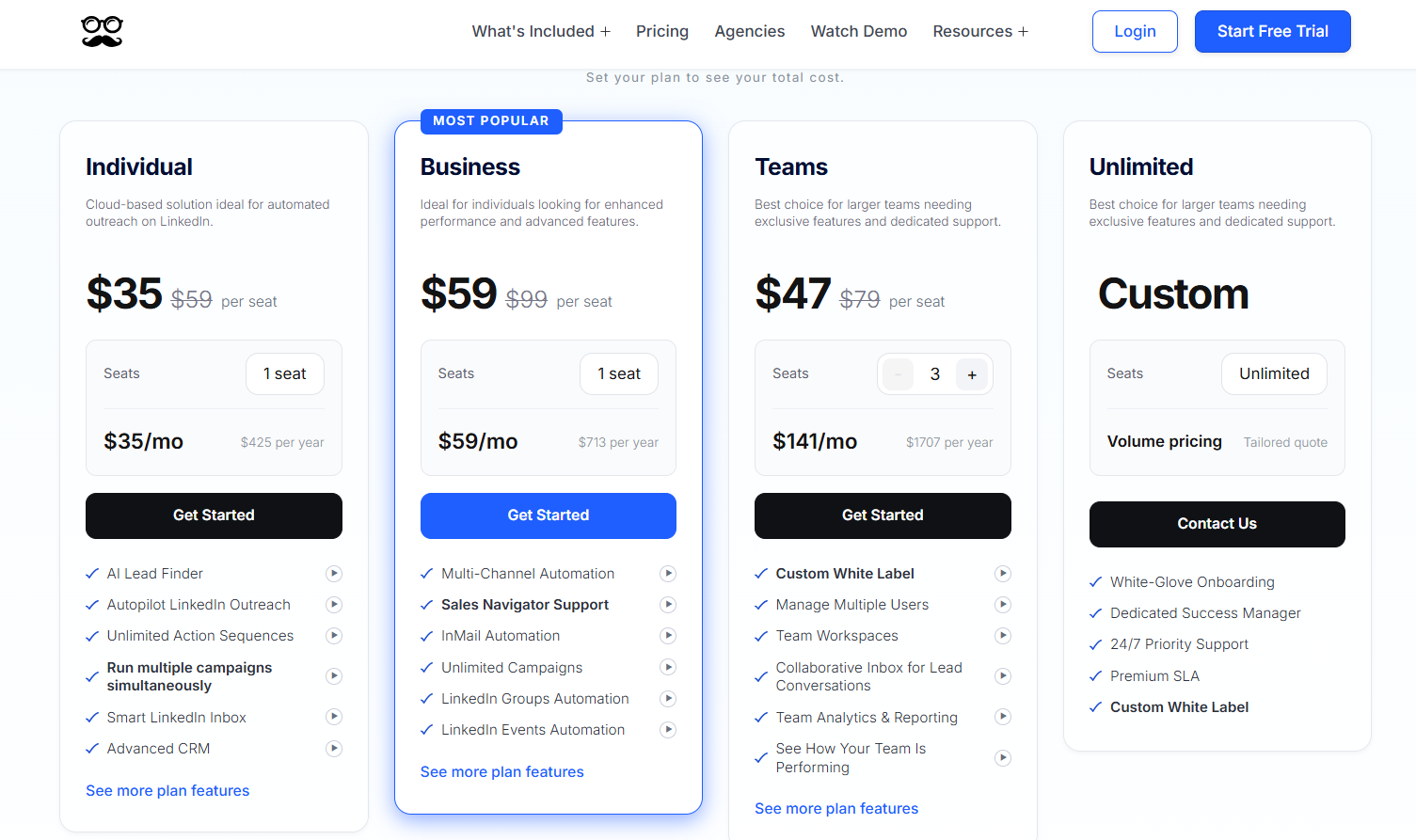
The full campaign in this article needs Business, since post campaigns start on that plan, along with the InMail in Template 2 and the email in Template 6.
Individual still covers the LinkedIn-only templates with leads from LinkedIn search or AI Lead Finder.
Templates 1 and 3 would need rewording for a cold list, since both mention the post.
Start sending these templates with Meet Alfred
If I were setting this campaign up from scratch, I'd write the customer detail for Template 5 before anything else, since the other nine take minutes to adapt.
Then I'd launch it on one post with fresh engagement and give it two weeks before judging which templates get answered.
You can run the whole sequence on our 7-day free trial without entering card details.
If you'd like a second pair of eyes on your templates before the first send, you can book a demo with our team.
⚠️ Disclaimer: This article was last updated on the 22nd of October, 2026, and if there's any misinterpretation of the information, please contact us, and we will fact-check it.
Frequently asked questions
Can you reuse these LinkedIn outreach templates for a different lead source?
Yes, these LinkedIn outreach templates work with other lead sources once the reason for writing changes to match the new source.
For LinkedIn Event attendees, for example, I'd swap the post reference in the first few templates for the event name and leave everything else as it is.
With the campaign saved as a sequence template in Meet Alfred, the steps and delays carry over and only the wording needs editing.
Can you run personalized LinkedIn outreach from a free account?
Yes, though if you stay on a free account, the personalization has to move from the invitation into Template 3.
LinkedIn's limit of three personalized notes a month can't cover a list of post engagers.
Meet Alfred works with free (Basic) and Premium LinkedIn accounts, and the LinkedIn message steps run the same way on either.
How do you personalize a LinkedIn template beyond the first name?
You personalize a LinkedIn template beyond the first name by writing around the lead source and adding one detail that only a person can supply.
Everyone in this campaign engaged with the same post, which lets the first three templates mention it with no extra data.
AI-Personalization in Meet Alfred adds profile fields such as company and job title, and a CSV can carry anything a profile doesn't.
For tools that fill those fields in other ways, there's our roundup of LinkedIn personalization tools.
When should a LinkedIn outreach sequence stop?
A LinkedIn outreach sequence should stop the moment a prospect replies, or after a final message that's honest about being the last one.
In this campaign, Template 7 is that final message, roughly two and a half weeks after the connection was accepted.
Template 10 can still reopen the thread later, since a job change triggers it and not the campaign.
The sales outreach guide on our blog covers outreach more broadly.
Gustavo Parra is a Senior SEO & Content Strategist at Meet Alfred, where he specializes in LinkedIn automation, AI-driven outreach, and account-safe growth strategies. He works closely with product, engineering, and support teams to design automation frameworks that help sales teams and agencies scale LinkedIn outreach while minimizing risk. Gustavo focuses on turning real platform data and firsthand product experience into practical, compliance-first guidance.
Related Articles